 SolarSavings
Applying for the PM Surya Ghar Muft Bijli Yojana is only the first step. To successfully claim your Central Financial Assistance (CFA) subsidy, your application must successfully pass through five distinct approval stages.
Since the national portal was launched, millions of applicants have experienced delays because they do not know what stage their application is currently in or how to resolve blockages. Whether your profile shows "Technical Feasibility Pending", "Vendor Selection Awaiting", or your subsidy payout has not hit your bank account, this guide will walk you through exactly how to track and speed up your approval process.
1. How to Perform the PM Surya Ghar Status Check Online
Tracking your registration is done strictly via the official government portal. You do not need to visit local power offices or pay agents to verify your application status. Follow these direct steps to log in:
- Navigate to the official national portal at pmsuryaghar.gov.in.
- Click on the Login button on the primary navigation header and choose "Consumer Login".
- Enter your registered Mobile Number and the Consumer Account Number linked to your local electricity distribution company (DISCOM).
- Input the OTP sent to your phone and solve the captcha to access your personalized candidate dashboard.
- Your dashboard will display a visual timeline highlighting which of the steps are completed (green mark) and which step is currently active or pending.
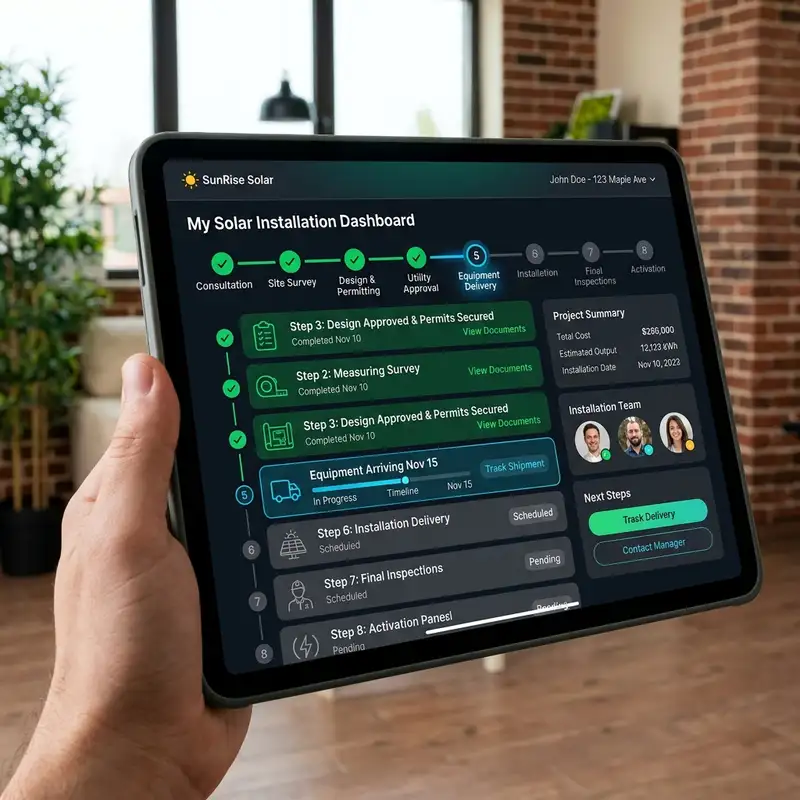
A dashboard mock-up displaying the step-by-step progress tracking workflow of a residential solar panel application.
2. Decoding Every Application Status Message
The portal uses several specialized status terms to indicate where your application sits. Understanding what these mean helps you know if your installer needs to act or if the delay lies with your local utility company.
| Status Message | Meaning & Detail | Action Required |
|---|---|---|
| Technical Feasibility Pending | The local DISCOM engineer is assessing if your neighborhood transformer can handle the surplus power exported by your panels. | Wait for audit (7-14 days) |
| Awaiting Vendor Agreement | Your technical feasibility is approved. You must now select and upload an agreement with an empanelled vendor. | Submit vendor contract |
| Net Metering Connection Pending | Solar panels have been installed by the vendor. The system is awaiting grid integration and net-meter setup. | DISCOM setup required |
| Joint Inspection Complete | The physical site safety audit has been signed off by the vendor and DISCOM engineers. The system is live. | Upload banking details |
| Subsidy Disbursed / Paid | The Central Financial Assistance has been sent via Direct Benefit Transfer (DBT) to the bank account provided. | None (Verify Bank Ledger) |
Technical Feasibility: The First Major Hurdle
The "Technical Feasibility Pending" status is where nearly 40% of applicants face their first delay. Your local electricity provider (like MSEDCL, UPPCL, or PGVCL) must inspect your service connection and evaluate the local substation transformer load.
By law, solar installations on a single transformer cannot exceed a set percentage of that transformer's total capacity (typically 30-50% depending on state regulations). If your neighborhood has reached this limit, your feasibility status may be updated to "Rejected due to capacity constraints." If this happens, you will need to reapply once the local DISCOM upgrades their infrastructure, or appeal for a load capacity review. You can read more about resolving these technical issues in our detailed guide on PM Surya Ghar Rejection Reasons.
3. What to Do If Your Application is Stuck
If your status has not changed for more than three weeks, it is critical to take action. Leaving it unattended can lead to your application being automatically archived by the portal. Here is how to handle the most common bottlenecks:
Stuck at "Feasibility Pending"
If your feasibility audit is stuck, it usually means the field engineer has a backlog of physical site visits. You can address this by logging into your state's regional DISCOM consumer portal using your consumer credentials. Many state portals require a separate file upload of your structural certificate or roof photograph before they schedule the field visit.
Stuck at "Net Metering Installation Pending"
After your vendor installs the photovoltaic panels and the inverter, they must upload the work completion report. Once uploaded, the DISCOM is legally mandated to install the bidirectional net meter within 15 days. If this is delayed:
- Confirm that your empanelled vendor has formally submitted the completion certificate on the national portal.
- Check if you need to pay a separate net-meter integration fee on your DISCOM's local website.
- Escalate the delay to your area's sub-divisional officer (SDO) by referencing your National Portal application ID.
Stuck at "Subsidy Awaiting DBT"
This is the final stage. Once your net meter is installed and the joint inspection report is uploaded, your subsidy calculation is processed. If the payout takes longer than 30 days:
- Verify that the bank account name uploaded to the portal matches the name on your electricity bill exactly.
- Ensure the bank account is Aadhaar-seeded and active. Direct Benefit Transfer (DBT) transactions will bounce if your account has dormant limits or if your KYC has expired.
- Double-check the IFSC code. If your bank went through a recent merger (e.g., Syndicate Bank merging with Canara Bank), the old IFSC will fail. You must submit a bank account update request on the portal.
4. Official Timeline from Submission to DBT Payout
Understanding the expected timeline prevents unnecessary stress. Below is the typical schedule of a standard, hassle-free solar rooftop installation under the 2026 scheme:
- Step 1: Registration and Feasibility: 7 to 15 working days. This depends entirely on the efficiency of your local DISCOM field officers.
- Step 2: Vendor Agreement & Procurement: 5 to 7 days. This is under your control. The faster you sign the contract with an empanelled dealer, the faster they can allocate panels.
- Step 3: Installation & Completion Upload: 3 to 5 days. Actual rooftop structure assembly and wiring takes only 1-2 days.
- Step 4: Net Meter setup & Joint Inspection: 10 to 20 days. The DISCOM must coordinate with the vendor to perform the safety audit.
- Step 5: DBT Payout: 30 days from the Joint Inspection approval.
The total process averages **45 to 60 days**. To estimate your potential system size, capital cost, and exact government financial assistance beforehand, make sure to use our interactive Rooftop Solar Subsidy Calculator on the homepage.
5. Frequently Asked Questions
Here are the direct answers to the most common questions regarding status updates and delays: