 SolarSavings
PM Surya Ghar Consumer Login Portal (2026)

By Rahul Sharma
B.Tech Electrical | Solar Technical Reviewer | Updated: 2026
The National Portal for PM Surya Ghar: Muft Bijli Yojana provides secure, separate digital gateways for homeowners (Consumers) and registered solar installers (Empanelled Vendors). The Ministry of New and Renewable Energy (MNRE) has mandated that all subsidy claims, net-metering applications, and Technical Feasibility Approvals (TFA) must be routed through this unified portal.
This comprehensive 2026 guide walks you through the official login process, troubleshooting common OTP errors, tracking your DISCOM feasibility status, managing your net metering commissioning reports, and ultimately claiming your ₹78,000 Central Financial Assistance (CFA) subsidy via Direct Benefit Transfer (DBT).
⚡ Quick Answer: How to Access PM Surya Ghar Consumer Login
To access the official PM Surya Ghar Consumer Portal, visit pmsuryaghar.gov.in/consumerLogin. Enter your registered 10-digit mobile number, select your State and DISCOM, and authenticate using the 6-digit OTP sent to your phone. Inside your dashboard, you can monitor Technical Feasibility Approval (TFA), choose empanelled vendors, submit DCR commissioning reports, and claim your ₹78,000 Central Financial Assistance (CFA) subsidy.
National Portal for Rooftop Solar (MNRE)
1. The Official Consumer Login Gateway
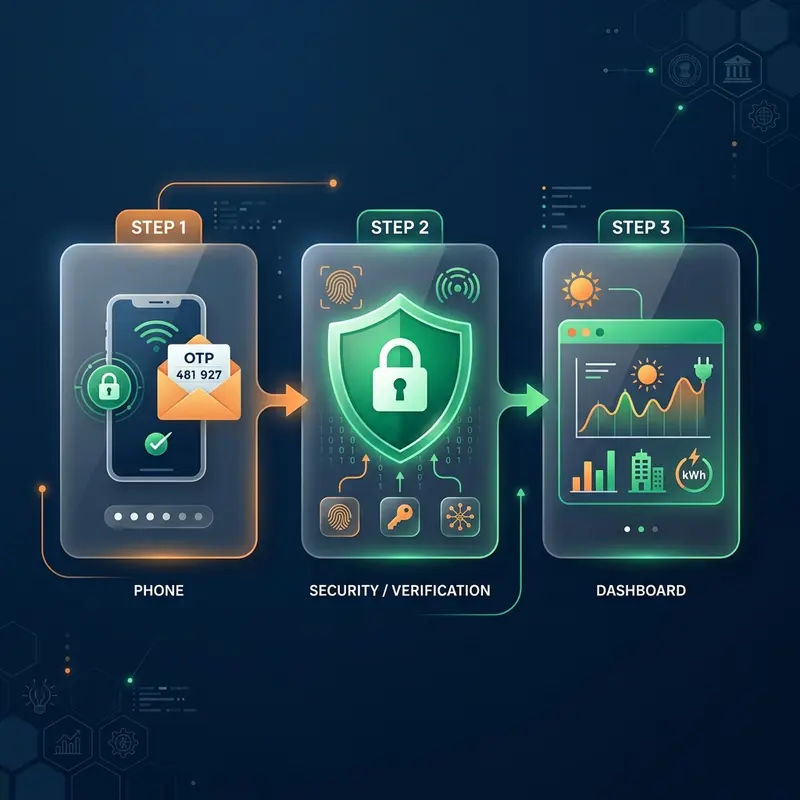
Homeowners applying for the PM Surya Ghar Muft Bijli Yojana central subsidy must log into the Consumer Portal to track their application lifecycle. Unlike older government portals, the National Portal uses a password-less, highly secure OTP authentication system linked directly to your registered mobile number and Aadhaar-seeded bank account.
- Official Portal URL: https://pmsuryaghar.gov.in/consumerLogin
- Primary Credential: 10-digit Mobile Number (used during your initial Portal Registration).
- Authentication Method: One-Time Password (OTP) delivered via SMS (valid for 10 minutes).
- Governing Body: Ministry of New and Renewable Energy (MNRE) & National Informatics Centre (NIC).
2. Key Actions Inside the Consumer Dashboard
Once authenticated, you are redirected to the PM Surya Ghar Consumer Dashboard. This interface is your command center. It displays your unique Application Reference Number (ARN) and real-time workflow status across 4 critical deployment stages. Managing these stages correctly is mandatory to receive your solar subsidy.
1. Technical Feasibility (TFA)
Track your local DISCOM's technical feasibility report approval. This confirms your local transformer has the capacity for your sanctioned solar load.
2. Select Empanelled Vendor
Browse the official directory and select an ALMM-empanelled solar installer operating in your district to generate an EPC contract.
3. Net Metering & DCR
Upload your bi-directional net meter installation details and Domestic Content Requirement (DCR) solar module serial number certificates.
4. Claim Subsidy (DBT)
Submit your cancelled cheque and Aadhaar-linked bank details to trigger the ₹78,000 Direct Benefit Transfer directly into your account.
3. Step-by-Step Guide: How to Login as a Consumer
Navigating the portal is straightforward if you follow the correct sequence. Ensure you have your mobile phone and your latest electricity bill handy before starting.
- Navigate to the Portal: Open your web browser and go to the official URL:
pmsuryaghar.gov.in/consumerLogin. - Input Mobile Number: Enter the 10-digit mobile number you used during the registration phase. Do not add +91.
- Enter Captcha: Carefully type the case-sensitive alphanumeric captcha code displayed on the screen.
- Request OTP: Click the "Next" or "Send OTP" button. The NIC servers will dispatch a 6-digit OTP to your phone.
- Authenticate: Enter the OTP and click "Login". You will instantly be redirected to your personalized dashboard showing your ARN and current application status.
4. Resolving Common Login Errors & Troubleshooting Issues
The National Portal experiences heavy traffic, which can sometimes lead to login failures. If you encounter technical issues logging into pmsuryaghar.gov.in, review these verified solutions before contacting the grievance officer or helpline:
Error 1: "Consumer Account Number Not Found"
Root Cause: Mismatch between the DISCOM name selected and the Consumer Account Number (CA Number / K-Number) on your monthly electricity bill.
Fix: Ensure you select your exact DISCOM division. For example, in Maharashtra, MSEDCL (Mahavitaran), BEST, and Adani Electricity are treated as entirely separate portal entities. In UP, verify whether your bill is issued by MVVNL, PVVNL, or DVVNL. If the error persists, contact your local DISCOM nodal office to sync your bill with the master database.
Error 2: "OTP Delayed, Expired, or Not Received"
Root Cause: NIC server traffic congestion during peak daytime hours, or your mobile operator is filtering the message due to DND (Do Not Disturb) settings.
Fix: Wait at least 180 seconds before clicking "Resend OTP". The OTP is valid for 10 minutes. If you still do not receive SMS OTPs, verify that your mobile number is active and not blocking transactional messages. For the highest success rate, attempt logging in during off-peak hours (before 9 AM or after 8 PM).
Error 3: "Mobile Number Changed or Account Lost"
Root Cause: SIM card deactivation, porting issues, or lost access to the primary mobile number registered on the portal.
Fix: You cannot change your registered mobile number directly from the login screen. You must submit a formal mobile number change request (application form) to your DISCOM nodal officer along with a copy of your electricity bill, Aadhaar card, and a written letter. Alternatively, log a formal ticket via the PM Surya Ghar National Helpline.
5. The Separate Vendor Login Gateway
It is important to note that Solar installers, EPC contractors, and ALMM equipment vendors cannot use the Consumer Portal. They must access a completely separate Vendor Portal to accept consumer installation quotes, upload DCR solar module serial numbers, and submit net-metering commissioning reports to the DISCOM.
- Vendor Portal Link: https://pmsuryaghar.gov.in/vendorLogin
- Login Credentials: Registered Vendor Email ID (or Vendor ID) + Password + Captcha.
- Empanelment Directory: Consumers looking for approved installers can view the updated state-wise Empaneled Vendor List without needing to log in. Vendors: see our PM Surya Ghar vendor login guide for step-by-step portal access instructions.
6. Security and Privacy Guidelines
To protect your financial data and subsidy payout, never share your login OTP with third-party agents claiming they can "speed up" your application. The MNRE and DISCOM officials will never ask for your OTP over a phone call. Always ensure the URL in your browser explicitly starts with https://pmsuryaghar.gov.in before entering any information.
Explore PM Surya Ghar Yojana Guides & Tools
Access our complete suite of official guides, subsidy tools, and state DISCOM trackers to maximize your solar investment: